
Infilling#
Missing data happens. Fill the gaps with precision and care.
Why use Time-Stream?#
It is inevitable that real-world monitoring data has gaps, whether that’s from: communications outages, sensor swaps or power cuts. With Time-Stream, you can fill those missing values with a robust infilling procedure that benefits from deep knowledge of the time properties of your data.
One-liner#
With Time-Stream you state intent, not mechanics:
tf.infill("linear", "flow", max_gap_size=3)
That’s it, a single line with clear intent: “I want to use the linear infill method on my flow data, but only for gaps ≤ 3 steps”.
Complex example#
Let’s take our example 15-minute river flow data that contains a few short outages. You might want to:
Fill only gaps up to 3 consecutive steps (≤45 minutes).
Use linear interpolation to infill tiny gaps (1 step) and a more complex interpolator (e.g. PCHIP) for ≥2 step gaps.
Input:
15-minute river flow timeseries, including some missing data.
shape: (110_977, 2)
┌─────────────────────┬───────────┐
│ time                ┆ flow      │
│ ---                 ┆ ---       │
│ datetime[μs]        ┆ f64       │
╞═════════════════════╪═══════════╡
│ 2020-09-01 00:00:00 ┆ 92.860538 │
│ 2020-09-01 00:15:00 ┆ null      │
│ 2020-09-01 00:30:00 ┆ 98.103103 │
│ 2020-09-01 00:45:00 ┆ null      │
│ 2020-09-01 01:00:00 ┆ null      │
│ 2020-09-01 01:15:00 ┆ null      │
│ 2020-09-01 01:30:00 ┆ null      │
│ 2020-09-01 01:45:00 ┆ 92.085242 │
│ …                   ┆ …         │
│ 2023-10-31 22:15:00 ┆ 84.677897 │
│ 2023-10-31 22:30:00 ┆ 86.0179   │
│ 2023-10-31 22:45:00 ┆ 83.122459 │
│ 2023-10-31 23:00:00 ┆ 76.928613 │
│ 2023-10-31 23:15:00 ┆ 83.320365 │
│ 2023-10-31 23:30:00 ┆ null      │
│ 2023-10-31 23:45:00 ┆ null      │
│ 2023-11-01 00:00:00 ┆ 84.721752 │
└─────────────────────┴───────────┘
Code:
import time_stream as ts

# Wrap the DataFrame in a TimeFrame object
tf = ts.TimeFrame(df, "time", resolution="PT15M", periodicity="PT15M")

# Infill gaps
tf_infill = tf.infill(
    "linear", "flow", max_gap_size=1
).infill(
    "pchip", "flow", max_gap_size=3
)
Output:
<time_stream.TimeFrame> Size (estimated): 1.71 MB
Time properties:
    Time column : time  [2020-09-01 00:00:00, ..., 2023-11-01 00:00:00]
    Type        : Datetime(time_unit='us', time_zone=None)
    Resolution  : PT15M
    Offset      : None
    Alignment   : PT15M
    Periodicity : PT15M
    Anchor      : start
Columns:
    flow        : Float64  880.56 KB  [92.86053821660515, ..., 84.72175228556347]
DataFrame:
shape: (110_977, 2)
┌─────────────────────┬───────────┐
│ time                ┆ flow      │
│ ---                 ┆ ---       │
│ datetime[μs]        ┆ f64       │
╞═════════════════════╪═══════════╡
│ 2020-09-01 00:00:00 ┆ 92.860538 │
│ 2020-09-01 00:15:00 ┆ 95.48182  │
│ 2020-09-01 00:30:00 ┆ 98.103103 │
│ 2020-09-01 00:45:00 ┆ null      │
│ 2020-09-01 01:00:00 ┆ null      │
│ 2020-09-01 01:15:00 ┆ null      │
│ 2020-09-01 01:30:00 ┆ null      │
│ 2020-09-01 01:45:00 ┆ 92.085242 │
│ …                   ┆ …         │
│ 2023-10-31 22:15:00 ┆ 84.677897 │
│ 2023-10-31 22:30:00 ┆ 86.0179   │
│ 2023-10-31 22:45:00 ┆ 83.122459 │
│ 2023-10-31 23:00:00 ┆ 76.928613 │
│ 2023-10-31 23:15:00 ┆ 83.320365 │
│ 2023-10-31 23:30:00 ┆ 84.13571  │
│ 2023-10-31 23:45:00 ┆ 84.584441 │
│ 2023-11-01 00:00:00 ┆ 84.721752 │
└─────────────────────┴───────────┘
Key benefits#
Conservative: You set the rules; the library enforces them.
Time aware: Honours the resolution and periodicity properties of your data.
Simple code: One call conveys the method, scope, and policy.
In more detail#
The infill() method is the entry point for infilling your
timeseries data in Time-Stream. There are various infill methods available; from using alternative data from
another source, to delegating to well established methods from the SciPy data science library. All methods are combined with the time-integrity
of your TimeFrame.
Let’s look at the method in more detail:
- TimeFrame.infill(infill_method, column_name, max_gap_size=None, observation_interval=None, flag_params=None, **kwargs)[source]
Apply an infilling method to a column in the TimeFrame to fill in missing data.
- Parameters:
infill_method (
Union[str,Type[InfillMethod],InfillMethod]) – The method to use for infillingcolumn_name (
str) – The column to infillmax_gap_size (
int|None) – The maximum size of consecutive null gaps that should be filled. Any gap larger than this will not be infilled and will remain as null.observation_interval (
tuple[datetime,datetime|None] |None) – Optional time interval to limit the check to.flag_params (
tuple[str,str|int] |None) – Tuple of (flag column name [str], flag value [str | int]. If provided, add given flag value to the flag column on rows that were infilled. If not provided, no flags added.**kwargs – Parameters specific to the infill method.
- Return type:
- Returns:
A TimeFrame containing the aggregated data.
Infill methods#
The infill_method parameter lets you choose how missing values are estimated by passing a method name as a string.
Each method has its strengths, depending on your data. The currently available methods are:
Alternative data methods#
alt_data#
What it does: Infills from an alternative source - either another column in your TimeFrame or a separate DataFrame - applying a single fixed correction factor across the entire column.
- When to use:
When you have a secondary data source that can stand in for missing values, such as a nearby gauge or a modelled estimate
When the relationship between your primary and secondary data is stable and you know (or can estimate) the scaling - for example, a nearby gauge that consistently reads 10% higher.
- Additional args:
alt_data_column: The name of the column providing the alternative data.
correction_factor: An optional multiplier to apply to the alternative data (default: 1.0).
alt_df: A separate Polars DataFrame containing the alternative data. If omitted, the column is taken from the current TimeFrame.Example usage:
tf_filled = tf.infill("alt_data", "flow", alt_data_column="flow_model", alt_df=model_df)See Alternative data infilling for a worked example.
alt_data_dynamic#
time_stream.infill.AltDataDynamic
What it does: Like
alt_data, but instead of a fixed correction factor it calculates one per gap from the data surrounding it. For each contiguous gap, a time window is defined around the gap and the correction factor is computed as the ratio of the primary data to the alternative data within that window. The alternative data for the missing interval is then scaled by this local factor.
- When to use:
When you have a secondary data source that can stand in for missing values, such as a nearby gauge or a modelled estimate
When the relationship between the primary and secondary data varies over time and you want the correction to adapt to each gap’s local context rather than applying a single global value.
- Additional args:
alt_data_column: The name of the column providing the alternative data.
alt_df: A separate Polars DataFrame containing the alternative data. If omitted, the column is taken from the current TimeFrame.
window_size: A period around the missing data to be used to calculate the correction factor, as an ISO 8601 duration string, aPeriod, or adatetime.timedelta.
window_side: Optional. By default, windows on both sides of the missing data are used to infill. If “left”, only data to left of missing data is used to infill. If “right”, only data to right of missing data is used to infill.
min_threshold: Minimum number of datapoints to use to calculate the correction factor.
max_threshold: Maximum number of datapoints to use to calculate the correction factor.Example usage:
tf_filled = tf.infill(
    "alt_data_dynamic",
    "flow",
    alt_data_column="flow_model",
    alt_df=model_df,
    window_size="P3D",
    min_threshold=2,
    max_threshold=4,
    window_side="left",
)
See Alternative data dynamic infilling for worked examples covering thresholds, one-sided windows, and window size formats.
Polynomial interpolation#
linear#
time_stream.infill.LinearInterpolation
What it does: Straight-line interpolation between neighbouring known points.
When to use: Simple and neutral; best for short gaps where the underlying signal is unlikely to curve significantly.
Additional args: None.
Example usage:
tf_filled = tf.infill("linear", "flow", max_gap_size=3)
quadratic#
time_stream.infill.QuadraticInterpolation
What it does: Second-order polynomial curve through neighbouring known points.
When to use: Captures gentle curvature; suitable when changes are not strictly linear but you do not need a high-order fit.
Additional args: None.
Example usage:
tf_filled = tf.infill("quadratic", "flow", max_gap_size=3)
cubic#
time_stream.infill.CubicInterpolation
What it does: Third-order polynomial curve through neighbouring known points.
When to use: Produces smooth transitions; can be useful for variables with cyclical patterns or gradually changing curvature.
Additional args: None.
Example usage:
tf_filled = tf.infill("cubic", "flow", max_gap_size=3)
bspline#
time_stream.infill.BSplineInterpolation
What it does: B-spline interpolation with a configurable polynomial order.
When to use: When you want full control over the interpolation order. The other polynomial methods (linear, quadratic, cubic) are convenience wrappers around this.
- Additional args:
order: Order of the B-spline (1-5, where 1=linear, 2=quadratic, 3=cubic).Example usage:
tf_filled = tf.infill("bspline", "flow", max_gap_size=3, order=4)
Shape-preserving methods#
pchip#
time_stream.infill.PchipInterpolation
What it does: Piecewise Cubic Hermite Interpolating Polynomial.
When to use: Preserves monotonicity and avoids overshoot; can help to avoid unrealistic fluctuations between known values. A good default when you want a smooth curve that respects the shape of your data.
Additional args: None.
Example usage:
tf_filled = tf.infill("pchip", "flow", max_gap_size=3)
akima#
time_stream.infill.AkimaInterpolation
What it does: Akima spline - a smooth curve fit that reduces oscillations near outliers.
When to use: Best for data with significant local variations and potential outliers, where standard cubic interpolation might overshoot.
Additional args: None.
Example usage:
tf_filled = tf.infill("akima", "flow", max_gap_size=5)
Note
All methods honour the maximum gap limit: they will only fill runs of missing values up to your chosen length, leaving longer gaps as NaN.
Note
For infill methods using interpolation techniques, NaN values at the very beginning and very end of a timeseries will remain NaN; there is no pre- or post- data to constrain the infilling method.
Column selection#
The column_name parameter lets you specify which column to infill; only this column will be used by the infill
function.
Observation interval#
The observation_interval parameter lets you specify an observation interval to restrict infilling
to a specific time window. This is useful when:
You only want to work with a subset of data (e.g. one hydrological year).
You want to fill recent gaps without touching the historical record.
You need to use different methods for different parts of your timeseries.
Example:
from datetime import datetime

tf_recent = tf.infill(
    "linear",
    "flow",
    observation_interval=(datetime(2024, 1, 1), datetime(2024, 12, 31)),
)
This will only attempt infilling between January to December 2024; gaps outside that interval remain untouched.
Max gap size#
Use the max_gap_size parameter to prevent over-eager interpolation. Only gaps less than this
(measured in consecutive missing steps) will be infilled.
Example:
# Fill single-step gaps only (≤ 15 minutes at 15-min resolution)
tf1 = tf.infill("linear", "flow", max_gap_size=1)

# Fill gaps up to 2 steps (≤ 30 minutes)
tf2 = tf.infill("akima", "flow", max_gap_size=2)
Note
The definition of “gap size” depends on the TimeFrame resolution.
At 15-minute resolution, max_gap_size=2 = 30 minutes; at daily resolution,
max_gap_size=2 = 2 days.
Flagging infilled values#
When infill() replaces a null value with an interpolated one, you
often want a record of which rows were touched. Pass flag_params=(flag_column_name, flag_value)
and Time-Stream will add the given flag to every row that went from null to non-null during
the infill. The flag column must already exist - see Flagging for how to create one.
Code:
# Register a flag system and create a flag column before running infill
tf.register_flag_system("INFILL_FLAGS", ["INFILLED"])
tf.init_flag_column("INFILL_FLAGS", "flow_flags")

# Run the infill and mark rows that were filled in
tf_infill = tf.infill("linear", "flow", max_gap_size=3, flag_params=("flow_flags", "INFILLED"))
Output:
shape: (110_977, 3)
┌─────────────────────┬───────────┬────────────┐
│ time                ┆ flow      ┆ flow_flags │
│ ---                 ┆ ---       ┆ ---        │
│ datetime[μs]        ┆ f64       ┆ i64        │
╞═════════════════════╪═══════════╪════════════╡
│ 2020-09-01 00:00:00 ┆ 92.860538 ┆ 0          │
│ 2020-09-01 00:15:00 ┆ 95.48182  ┆ 1          │
│ 2020-09-01 00:30:00 ┆ 98.103103 ┆ 0          │
│ 2020-09-01 00:45:00 ┆ null      ┆ 0          │
│ 2020-09-01 01:00:00 ┆ null      ┆ 0          │
│ 2020-09-01 01:15:00 ┆ null      ┆ 0          │
│ 2020-09-01 01:30:00 ┆ null      ┆ 0          │
│ 2020-09-01 01:45:00 ┆ 92.085242 ┆ 0          │
│ …                   ┆ …         ┆ …          │
│ 2023-10-31 22:15:00 ┆ 84.677897 ┆ 0          │
│ 2023-10-31 22:30:00 ┆ 86.0179   ┆ 0          │
│ 2023-10-31 22:45:00 ┆ 83.122459 ┆ 0          │
│ 2023-10-31 23:00:00 ┆ 76.928613 ┆ 0          │
│ 2023-10-31 23:15:00 ┆ 83.320365 ┆ 0          │
│ 2023-10-31 23:30:00 ┆ 83.787494 ┆ 1          │
│ 2023-10-31 23:45:00 ┆ 84.254623 ┆ 1          │
│ 2023-11-01 00:00:00 ┆ 84.721752 ┆ 0          │
└─────────────────────┴───────────┴────────────┘
Only rows whose value changed from null to non-null are flagged; rows that were already populated,
or that remain null because the gap exceeded max_gap_size, are left untouched.
Examples#
Alternative data infilling#
The "alt_data" infill method allows you to fill missing values in a column using data from an alternative source.
You can specify the alternative data in two ways:
From a column within the same TimeFrame: If the alternative data is already present as a column in your current
TimeFrameobject, you can directly reference it.From a separate DataFrame: You can provide an entirely separate Polars DataFrame containing the alternative data.
In both cases, you can also apply a correction_factor to the alternative data before it’s used for infilling.
Infilling from a separate DataFrame#
Let’s say you have a primary dataset with missing “flow” values, and a separate alt_df with “alt_data” that
can be used to infill these gaps.
Input:
shape: (110_977, 2)
┌─────────────────────┬───────────┐
│ time                ┆ flow      │
│ ---                 ┆ ---       │
│ datetime[μs]        ┆ f64       │
╞═════════════════════╪═══════════╡
│ 2020-09-01 00:00:00 ┆ 92.860538 │
│ 2020-09-01 00:15:00 ┆ null      │
│ 2020-09-01 00:30:00 ┆ 98.103103 │
│ 2020-09-01 00:45:00 ┆ null      │
│ 2020-09-01 01:00:00 ┆ null      │
│ …                   ┆ …         │
│ 2023-10-31 23:00:00 ┆ 76.928613 │
│ 2023-10-31 23:15:00 ┆ 83.320365 │
│ 2023-10-31 23:30:00 ┆ null      │
│ 2023-10-31 23:45:00 ┆ null      │
│ 2023-11-01 00:00:00 ┆ 84.721752 │
└─────────────────────┴───────────┘
shape: (110_977, 2)
┌─────────────────────┬────────────┐
│ time                ┆ alt_flow   │
│ ---                 ┆ ---        │
│ datetime[μs]        ┆ f64        │
╞═════════════════════╪════════════╡
│ 2020-09-01 00:00:00 ┆ 116.075673 │
│ 2020-09-01 00:15:00 ┆ 124.726315 │
│ 2020-09-01 00:30:00 ┆ 122.628878 │
│ 2020-09-01 00:45:00 ┆ 125.585763 │
│ 2020-09-01 01:00:00 ┆ 116.101802 │
│ …                   ┆ …          │
│ 2023-10-31 23:00:00 ┆ 96.160767  │
│ 2023-10-31 23:15:00 ┆ 104.150457 │
│ 2023-10-31 23:30:00 ┆ 105.125655 │
│ 2023-10-31 23:45:00 ┆ 100.174939 │
│ 2023-11-01 00:00:00 ┆ 105.90219  │
└─────────────────────┴────────────┘
Code:
tf_infill = tf.infill("alt_data", "flow", alt_df=alt_df, correction_factor=0.75, alt_data_column="alt_flow")
Output:
shape: (110_977, 2)
┌─────────────────────┬───────────┐
│ time                ┆ flow      │
│ ---                 ┆ ---       │
│ datetime[μs]        ┆ f64       │
╞═════════════════════╪═══════════╡
│ 2020-09-01 00:00:00 ┆ 92.860538 │
│ 2020-09-01 00:15:00 ┆ 93.544737 │
│ 2020-09-01 00:30:00 ┆ 98.103103 │
│ 2020-09-01 00:45:00 ┆ 94.189322 │
│ 2020-09-01 01:00:00 ┆ 87.076351 │
│ …                   ┆ …         │
│ 2023-10-31 23:00:00 ┆ 76.928613 │
│ 2023-10-31 23:15:00 ┆ 83.320365 │
│ 2023-10-31 23:30:00 ┆ 78.844241 │
│ 2023-10-31 23:45:00 ┆ 75.131204 │
│ 2023-11-01 00:00:00 ┆ 84.721752 │
└─────────────────────┴───────────┘
Alternative data dynamic infilling#
The "alt_data_dynamic" infill method computes a correction factor from data surrounding each gap,
rather than applying a fixed correction factor upfront.
Basic usage#
Code:
tf_infill = tf.infill(
    "alt_data_dynamic",
    "flow",
    alt_df=alt_df,
    alt_data_column="alt_flow",
    window_size="PT1H",
)
Output:
shape: (110_977, 2)
┌─────────────────────┬───────────┐
│ time                ┆ flow      │
│ ---                 ┆ ---       │
│ datetime[μs]        ┆ f64       │
╞═════════════════════╪═══════════╡
│ 2020-09-01 00:00:00 ┆ 92.860538 │
│ 2020-09-01 00:15:00 ┆ 99.781052 │
│ 2020-09-01 00:30:00 ┆ 98.103103 │
│ 2020-09-01 00:45:00 ┆ 100.46861 │
│ 2020-09-01 01:00:00 ┆ 92.881441 │
│ …                   ┆ …         │
│ 2023-10-31 23:00:00 ┆ 76.928613 │
│ 2023-10-31 23:15:00 ┆ 83.320365 │
│ 2023-10-31 23:30:00 ┆ 84.100524 │
│ 2023-10-31 23:45:00 ┆ 80.139951 │
│ 2023-11-01 00:00:00 ┆ 84.721752 │
└─────────────────────┴───────────┘
Using thresholds#
Use min_threshold and max_threshold to control how many data points are used when computing
the correction factor. min_threshold ensures enough data is available before infilling; max_threshold
caps the window so that only the data nearest the gap is used.
Code:
tf_infill = tf.infill(
    "alt_data_dynamic",
    "flow",
    alt_df=alt_df,
    alt_data_column="alt_flow",
    window_size="PT2H",
    min_threshold=2,
    max_threshold=4,
)
Output:
shape: (110_977, 2)
┌─────────────────────┬───────────┐
│ time                ┆ flow      │
│ ---                 ┆ ---       │
│ datetime[μs]        ┆ f64       │
╞═════════════════════╪═══════════╡
│ 2020-09-01 00:00:00 ┆ 92.860538 │
│ 2020-09-01 00:15:00 ┆ 99.781052 │
│ 2020-09-01 00:30:00 ┆ 98.103103 │
│ 2020-09-01 00:45:00 ┆ 100.46861 │
│ 2020-09-01 01:00:00 ┆ 92.881441 │
│ …                   ┆ …         │
│ 2023-10-31 23:00:00 ┆ 76.928613 │
│ 2023-10-31 23:15:00 ┆ 83.320365 │
│ 2023-10-31 23:30:00 ┆ 84.100524 │
│ 2023-10-31 23:45:00 ┆ 80.139951 │
│ 2023-11-01 00:00:00 ┆ 84.721752 │
└─────────────────────┴───────────┘
One-sided windows#
By default the correction factor is computed from data on both sides of a gap. Use window_side
to restrict it to one side only - useful when data quality or availability differs on either side.
Code:
tf_infill = tf.infill(
    "alt_data_dynamic",
    "flow",
    alt_df=alt_df,
    alt_data_column="alt_flow",
    window_size="PT1H",
    window_side="left",
)
Output:
shape: (110_977, 2)
┌─────────────────────┬───────────┐
│ time                ┆ flow      │
│ ---                 ┆ ---       │
│ datetime[μs]        ┆ f64       │
╞═════════════════════╪═══════════╡
│ 2020-09-01 00:00:00 ┆ 92.860538 │
│ 2020-09-01 00:15:00 ┆ 99.781052 │
│ 2020-09-01 00:30:00 ┆ 98.103103 │
│ 2020-09-01 00:45:00 ┆ 100.46861 │
│ 2020-09-01 01:00:00 ┆ 92.881441 │
│ …                   ┆ …         │
│ 2023-10-31 23:00:00 ┆ 76.928613 │
│ 2023-10-31 23:15:00 ┆ 83.320365 │
│ 2023-10-31 23:30:00 ┆ 84.100524 │
│ 2023-10-31 23:45:00 ┆ 80.139951 │
│ 2023-11-01 00:00:00 ┆ 84.721752 │
└─────────────────────┴───────────┘
Specifying window size#
window_size accepts an ISO 8601 duration string, a Period, or a
datetime.timedelta - all three are equivalent:
# window_size can be specified as an ISO 8601 duration string:
tf_infill_str = tf.infill(
    "alt_data_dynamic",
    "flow",
    alt_df=alt_df,
    alt_data_column="alt_flow",
    window_size="PT1H",
)

# ...as a Period object:
tf_infill_period = tf.infill(
    "alt_data_dynamic",
    "flow",
    alt_df=alt_df,
    alt_data_column="alt_flow",
    window_size=ts.Period.of_hours(1),
)

# ...or as a timedelta:
tf_infill_timedelta = tf.infill(
    "alt_data_dynamic",
    "flow",
    alt_df=alt_df,
    alt_data_column="alt_flow",
    window_size=timedelta(hours=1),
)
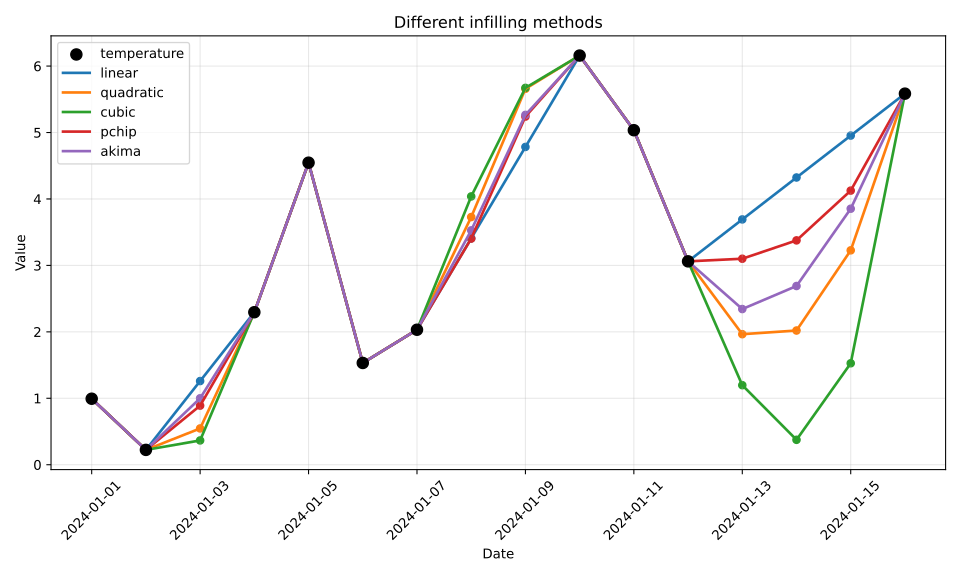
Visualisation of interpolation methods#
A quick visualisation of the results from the different interpolation infill methods is sometimes useful. However, bear in mind that this is a very simplistic example and the correct method to use is dependent on your data. You should do your research into which is most appropriate.
shape: (16, 7)
┌─────────────────────┬──────────┬──────────┬───────────┬──────────┬──────────┬──────────┐
│ time                ┆ original ┆ linear   ┆ quadratic ┆ cubic    ┆ pchip    ┆ akima    │
│ ---                 ┆ ---      ┆ ---      ┆ ---       ┆ ---      ┆ ---      ┆ ---      │
│ datetime[μs]        ┆ f64      ┆ f64      ┆ f64       ┆ f64      ┆ f64      ┆ f64      │
╞═════════════════════╪══════════╪══════════╪═══════════╪══════════╪══════════╪══════════╡
│ 2024-01-01 00:00:00 ┆ 0.993428 ┆ 0.993428 ┆ 0.993428  ┆ 0.993428 ┆ 0.993428 ┆ 0.993428 │
│ 2024-01-02 00:00:00 ┆ 0.223471 ┆ 0.223471 ┆ 0.223471  ┆ 0.223471 ┆ 0.223471 ┆ 0.223471 │
│ 2024-01-03 00:00:00 ┆ null     ┆ 1.259424 ┆ 0.546161  ┆ 0.365671 ┆ 0.889524 ┆ 1.000306 │
│ 2024-01-04 00:00:00 ┆ 2.295377 ┆ 2.295377 ┆ 2.295377  ┆ 2.295377 ┆ 2.295377 ┆ 2.295377 │
│ 2024-01-05 00:00:00 ┆ 4.54606  ┆ 4.54606  ┆ 4.54606   ┆ 4.54606  ┆ 4.54606  ┆ 4.54606  │
│ 2024-01-06 00:00:00 ┆ 1.531693 ┆ 1.531693 ┆ 1.531693  ┆ 1.531693 ┆ 1.531693 ┆ 1.531693 │
│ 2024-01-07 00:00:00 ┆ 2.031726 ┆ 2.031726 ┆ 2.031726  ┆ 2.031726 ┆ 2.031726 ┆ 2.031726 │
│ 2024-01-08 00:00:00 ┆ null     ┆ 3.407293 ┆ 3.727706  ┆ 4.038041 ┆ 3.404058 ┆ 3.527325 │
│ 2024-01-09 00:00:00 ┆ null     ┆ 4.782859 ┆ 5.658006  ┆ 5.671975 ┆ 5.239764 ┆ 5.265495 │
│ 2024-01-10 00:00:00 ┆ 6.158426 ┆ 6.158426 ┆ 6.158426  ┆ 6.158426 ┆ 6.158426 ┆ 6.158426 │
│ 2024-01-11 00:00:00 ┆ 5.034869 ┆ 5.034869 ┆ 5.034869  ┆ 5.034869 ┆ 5.034869 ┆ 5.034869 │
│ 2024-01-12 00:00:00 ┆ 3.061051 ┆ 3.061051 ┆ 3.061051  ┆ 3.061051 ┆ 3.061051 ┆ 3.061051 │
│ 2024-01-13 00:00:00 ┆ null     ┆ 3.692068 ┆ 1.96472   ┆ 1.197094 ┆ 3.10049  ┆ 2.34322  │
│ 2024-01-14 00:00:00 ┆ null     ┆ 4.323086 ┆ 2.019954  ┆ 0.375071 ┆ 3.37656  ┆ 2.68997  │
│ 2024-01-15 00:00:00 ┆ null     ┆ 4.954103 ┆ 3.226754  ┆ 1.527056 ┆ 4.125893 ┆ 3.853278 │
│ 2024-01-16 00:00:00 ┆ 5.58512  ┆ 5.58512  ┆ 5.58512   ┆ 5.58512  ┆ 5.58512  ┆ 5.58512  │
└─────────────────────┴──────────┴──────────┴───────────┴──────────┴──────────┴──────────┘