

5. Running a sensitivity analysis
5.1. Example 8. - Running a sensitivity analysis
As shown in Examples 6 & 7, to run multiple QC checks, you can use the apply_qc_framework().
This method also allows a “custom” framework to be user-defined.
In the below example, we will define a custom_framework that runs two different variations of the same
QC check. That check will be check_min_val_change which flags when there is shifts in the gauge data from the expected minimum values (see Figure 5 for example of minimum values by year).
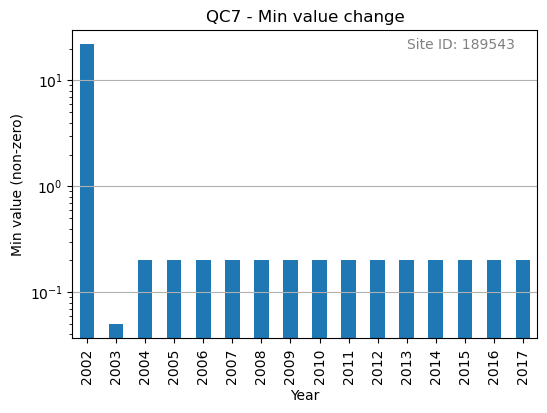
Figure 5. Minimum non-zero rainfall amounts each year.
We will check min values of 0.1 and 0.2 mm as part of our “custom” framework:
Apply checks from a QC frSamework to a rain gauge data
    import polars as pl
    from rainfallqc.qc_frameworks import apply_qc_framework

    network_data = pl.read_csv("hourly_rain_gauge_network.csv")

    # Define your custom framework
    custom_framework = {
        "CustomQC_check_1": {
            "function": gauge_checks.check_min_val_change,
        },
        "CustomQC_check_2": {
            "function": gauge_checks.check_min_val_change,
        },
    }

    qc_methods_to_run = ["CustomQC_check_1", "CustomQC_check_2"]

    qc_kwargs = {
        "CustomQC_check_1": {"expected_min_val": 0.1},
        "CustomQC_check_2": {"expected_min_val": 0.2},
        "shared": {"target_gauge_col": f"rain_gauge_1"},
    }

    # Run custom framework
    result = apply_qc_framework.run_qc_framework(
        network_data,
        qc_framework="custom", ## Set the user defined QC framework
        qc_methods_to_run=qc_methods_to_run,
        qc_kwargs=qc_kwargs,
        user_defined_framework=custom_framework,
    )