
Kittiwake case - with GPS maps
H_KI_run_gps.RmdLoad the seabORD package before running the examples below. If you have not yet installed the package, please follow the Installing seabORD instructions first.
Introduction & background
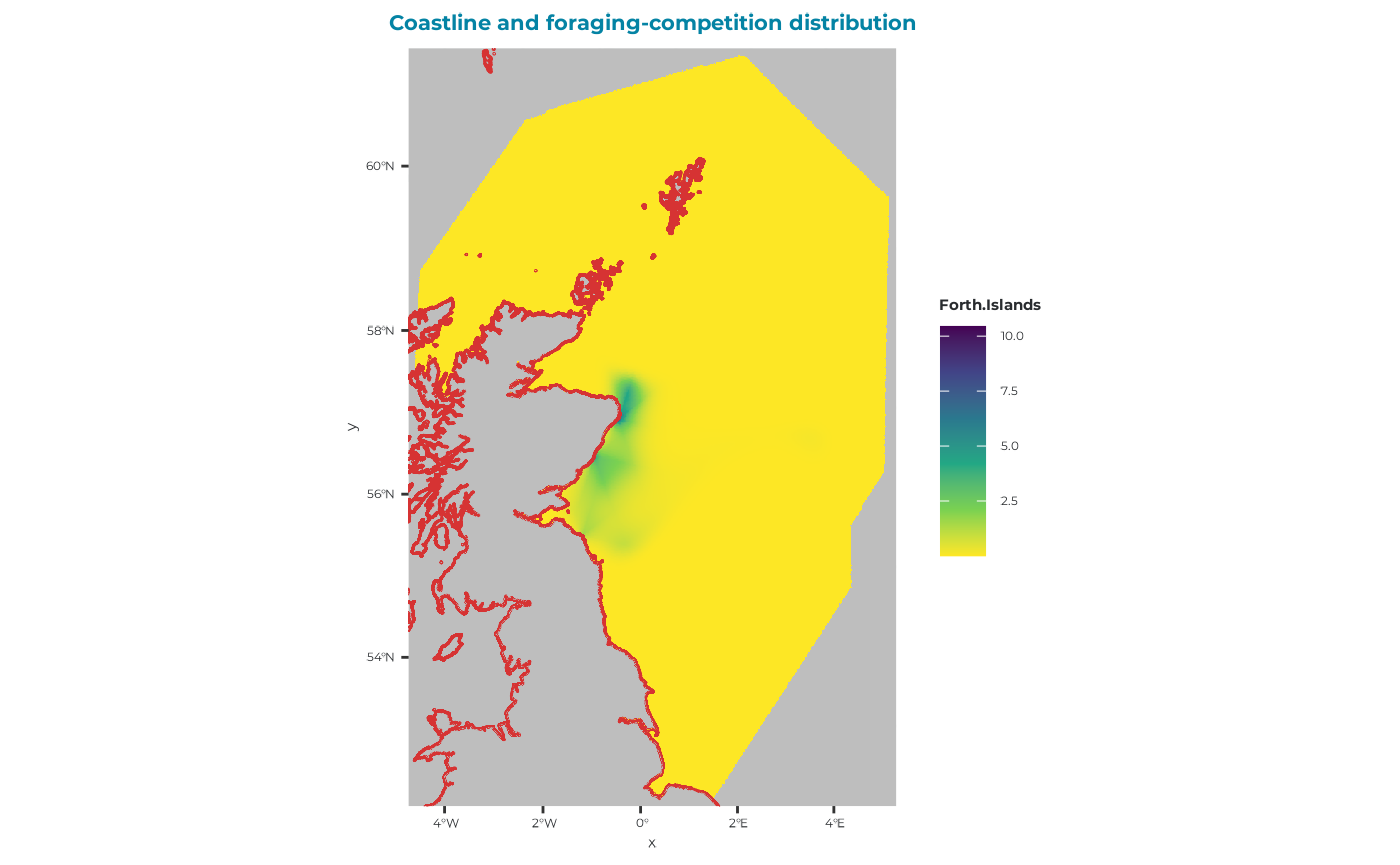
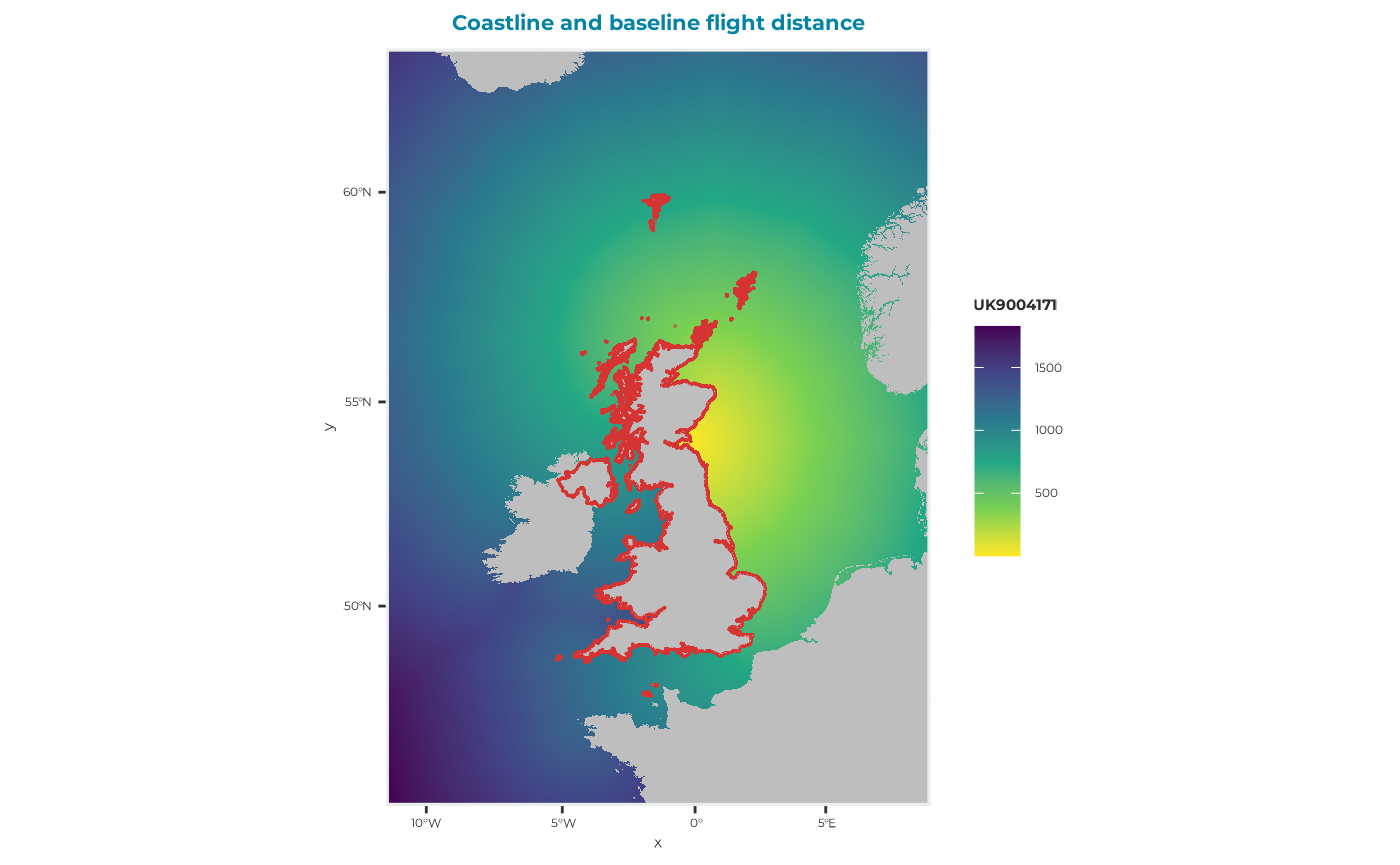
In this example, we simulate the potential impacts of two offshore renewable developments (ORDs) Inch Cape Wind Farm and Neart na Gaoithe Wind Farm, on a kittiwake colony located at Isle of May within the Forth Islands SPA (UK9004171). Bird distribution is represented using GPS maps.
The workflow consists of two main steps:
Model calibration – determine suitable prey density values by running baseline simulations without ORDs.
ORDs simulations – use the calibrated prey densities to assess the potential impacts of offshore renewable developments (ORDs) on adult and chick performance.
Case specific spatial inputs
Get the input parameters that you will use in the calibration and actual run (more information here).
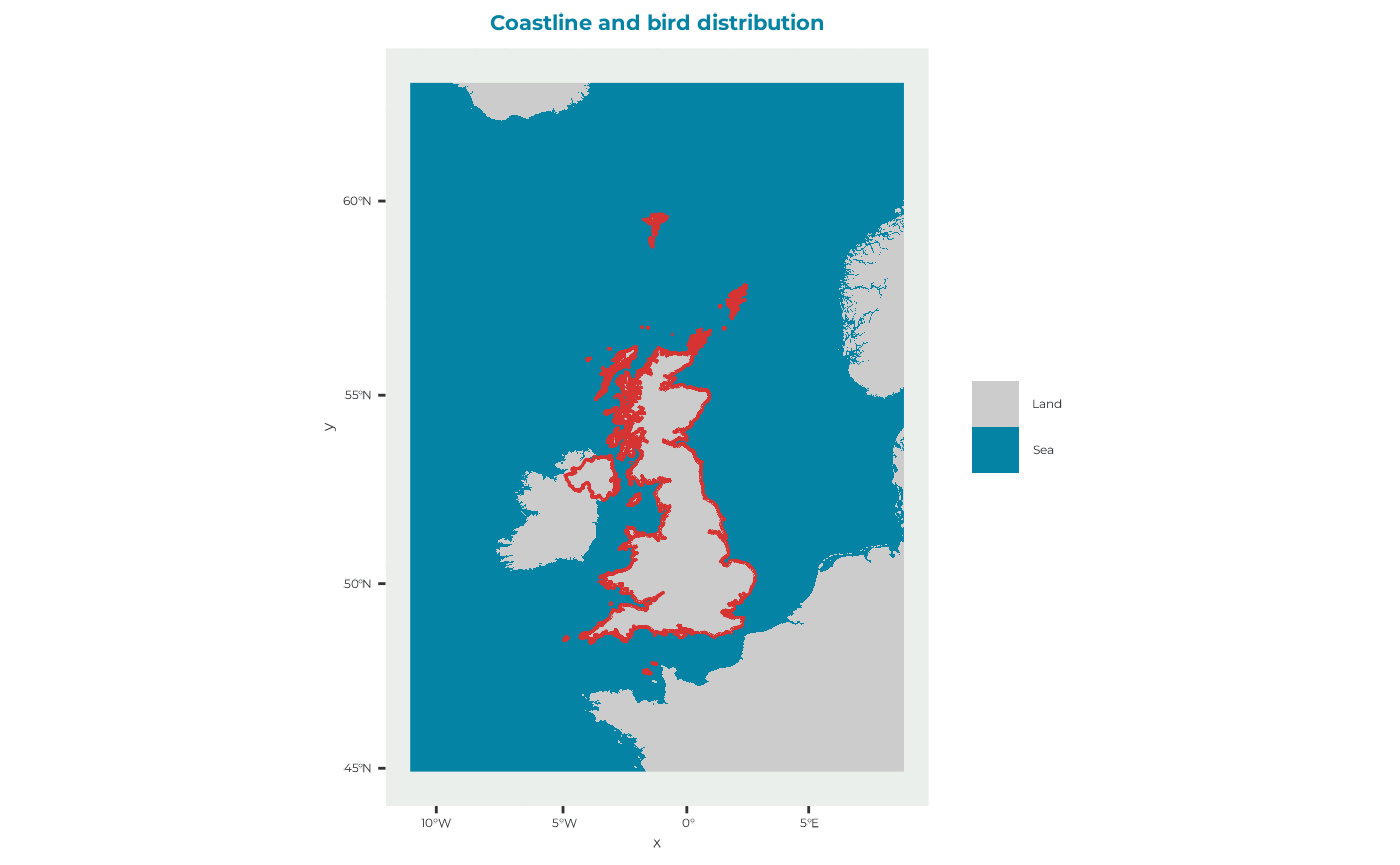
spadat1
In this case study the exact colony location is at (-2.564, 56.186).
spadat1_example <- seabORD::get_example_spadat1()spadat2
spadat2_example <- seabORD::get_example_spadat2()spdat
This are Kittiwake specific parameters for this run
spdat_example <- seabORD::get_example_spdat()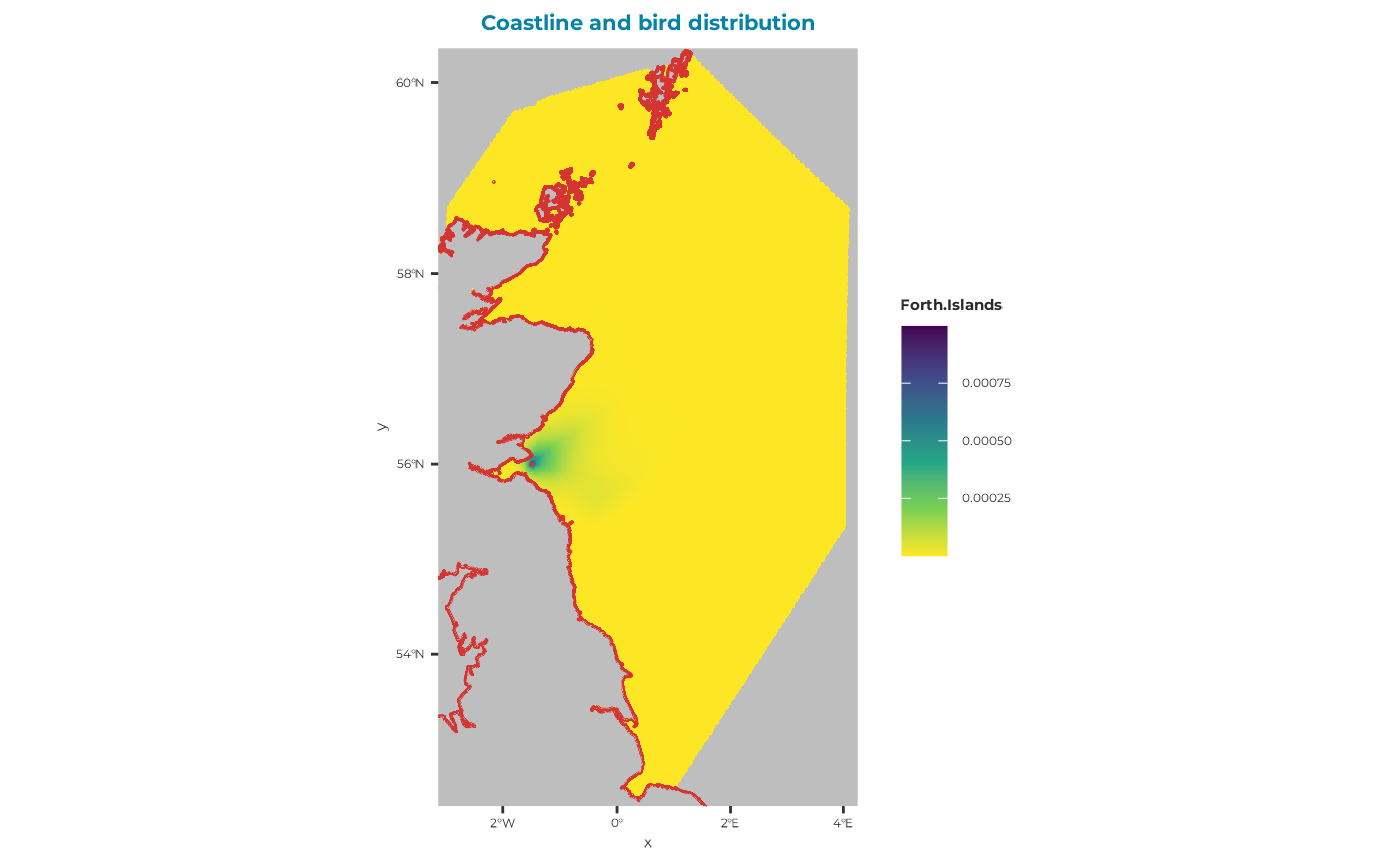
FlightGridcorrection
FlightGridcorrection_example <- seabORD::get_example_fgc_3035()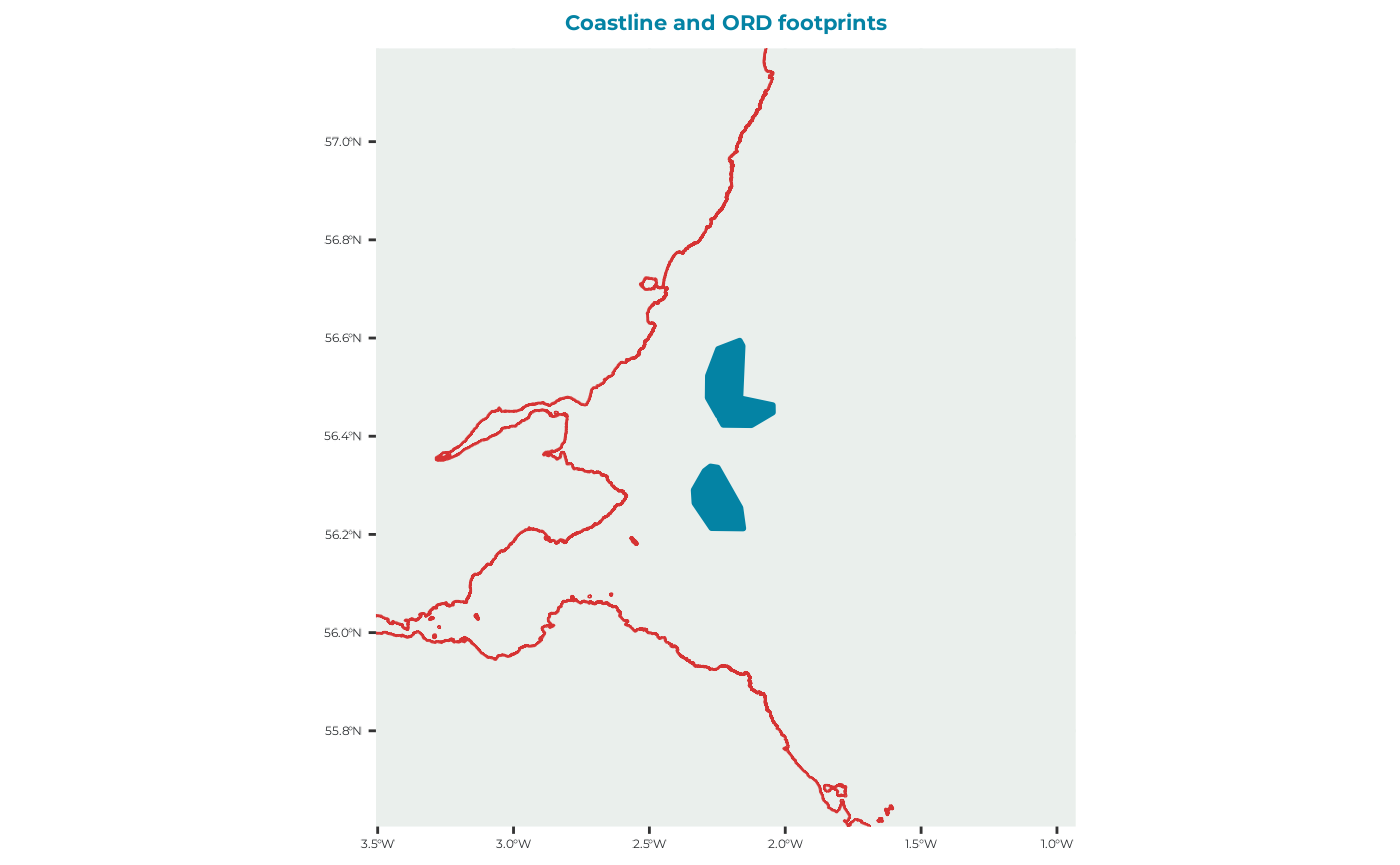
Step 1: Calibrating prey density
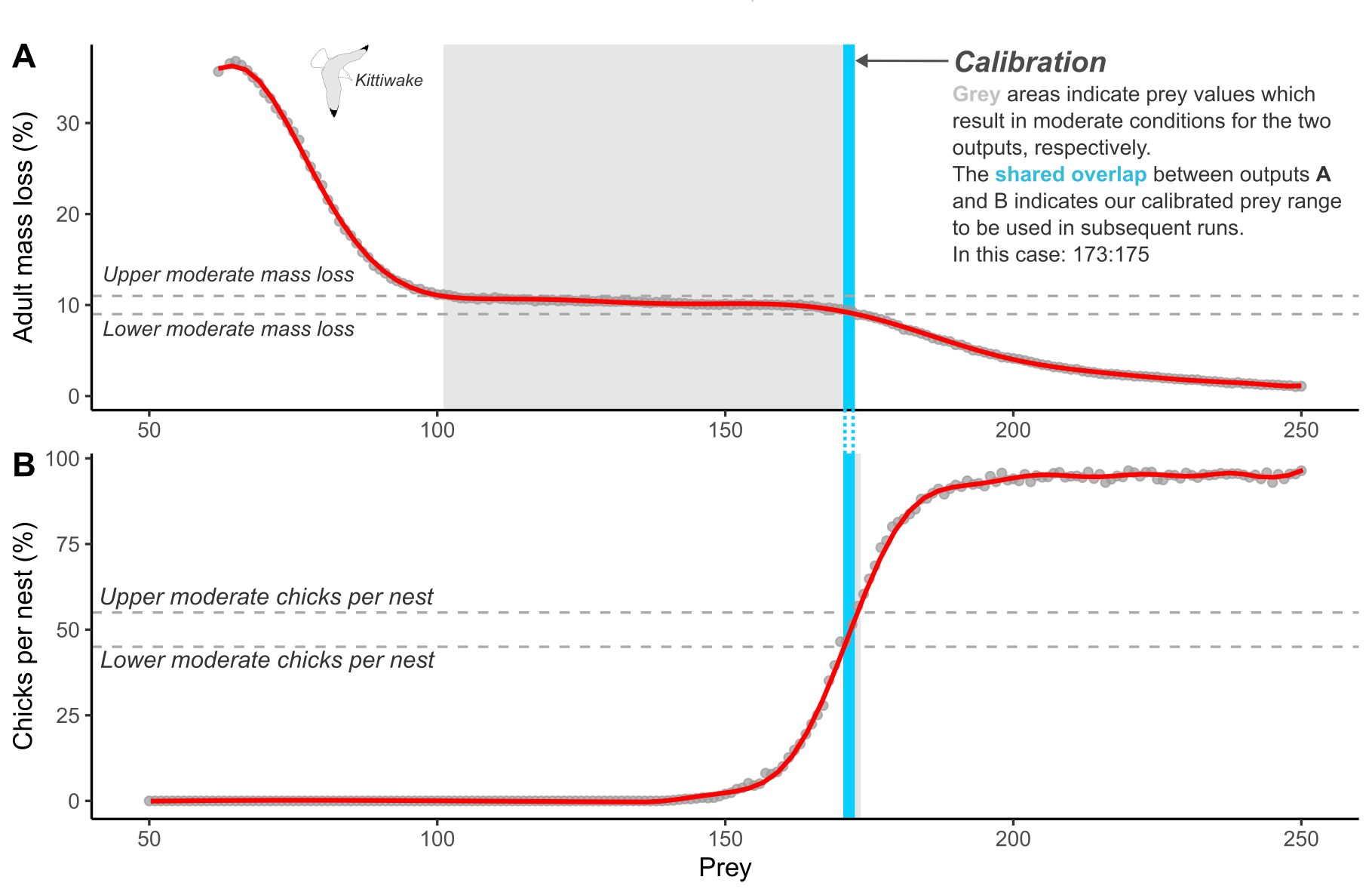
A key component of the seabORD model is the need to calibrate the prey level inputs used for each new species and colony combination. This currently involves re-running the model without ORDs (baseline simulations) with a range of prey levels to ascertain the range of values within which the model returns adult mass and chick mortality rates consistent with pre-defined values representing “moderate” conditions (Figure 1). This is to allow simulation of the range of outcomes expected under these conditions, as the model is highly sensitive to the prey density parameter.
Parameters sets for the calibration run
Set the parameters input specifically to perform the calibration run
Par
NOTE: “NScalefactor” is set to 0.1 meaning we are running with 10% of the population, which may be sufficient for calibration runs.
Par_example <- seabORD::get_example_par(type = "cal")modPar
modPar_example <- seabORD::get_example_modpar(type = "cal")
str(modPar_example)
#> List of 5
#>  $ Nparallel  : logi NA
#>  $ initialseed: num 6598
#>  $ reference  : chr "serial_calibration_KI_UK9004171"
#>  $ outputdir  : chr "output_seabORD"
#>  $ Nreplicates: num 20
Create the output folder , for example “output_seabORD_calibration” and assign it in the modPar list.
#set the output of ModPar
#specifically for calibration outputs if it doesn't alreay exist
if (!dir.exists("output_seabORD_calibration")) {
  dir.create("output_seabORD_calibration")
}
modPar_example$outputdir <- "output_seabORD_calibration"NOTE: Run this test! here is where our 20 replicates are specified - this must align with the number of prey values listed in “Par_example$Pmedian”.
seabORD::check_calibration_inputs(
  Par = Par_example,
  modPar = modPar_example
)
#> Calibration inputs valid: 20 replicate(s) and 20 prey value(s).
ordPar
ordPar should be empty, as there doesn’t need to be as we are only running baseline runs with no ORDs included.
ordPar_example <-  seabORD::get_example_ordPar(type = "cal")
str(ordPar_example)
#>  list()
Switches
Turn on the switch “savebirdflightmap”, to see an example of the birdflightmap output
switches_example <- seabORD::get_example_switches(type = "cal")
switches_example$savebirdflightmap <- TRUE

str(switches_example)
#> List of 14
#>  $ environment      : chr "serial"
#>  $ modelmode        : chr "calibration"
#>  $ debugmode        : num 0
#>  $ bycol            : logi FALSE
#>  $ bysus            : logi FALSE
#>  $ bych             : logi FALSE
#>  $ printdaily       : logi FALSE
#>  $ printseason      : logi FALSE
#>  $ printpair        : logi FALSE
#>  $ printfinal       : logi FALSE
#>  $ minout           : logi FALSE
#>  $ silent           : logi FALSE
#>  $ saverds          : logi TRUE
#>  $ savebirdflightmap: logi TRUE
Set off calibration runs
Now that the inputs have been prepared by loading them into our environment we can set off the run using the following code. You can also use the example output.
The ORDpoly is set to NULL in the calibration run, as this is not needed.
Calculates (Slow):
SeabORDoutput <- seabord(Par = Par_example,
                         ordPar = ordPar_example,
                         modPar = modPar_example,
                         switches = switches_example,
                         seamask = seamask_example,
                         spadat1 = spadat1_example,
                         spadat2 = spadat2_example,
                         spdat = spdat_example,
                         BrdData = BrdData_example,
                         FrgCompData = FrgCompData_example,
                         fltdist_base = fltdist_base_example,
                         FlightGridcorrection = FlightGridcorrection,
                         ORDpoly = NULL)
Load example calibration output (used throughout this vignette)
sbordout_calibration <- seabORD::get_example_output(type = "cal")Plot the outputs and determine prey values
For this particular example we define moderate conditions for kittiwakes on the Isle of May against the two following outputs:
| Output | Moderate value | Upper bound (+10%) | Lower bound (-10%) |
|---|---|---|---|
| Adult mass loss | 10% | 11% | 9% |
| Chicks per nest | 50% | 55% | 45% |
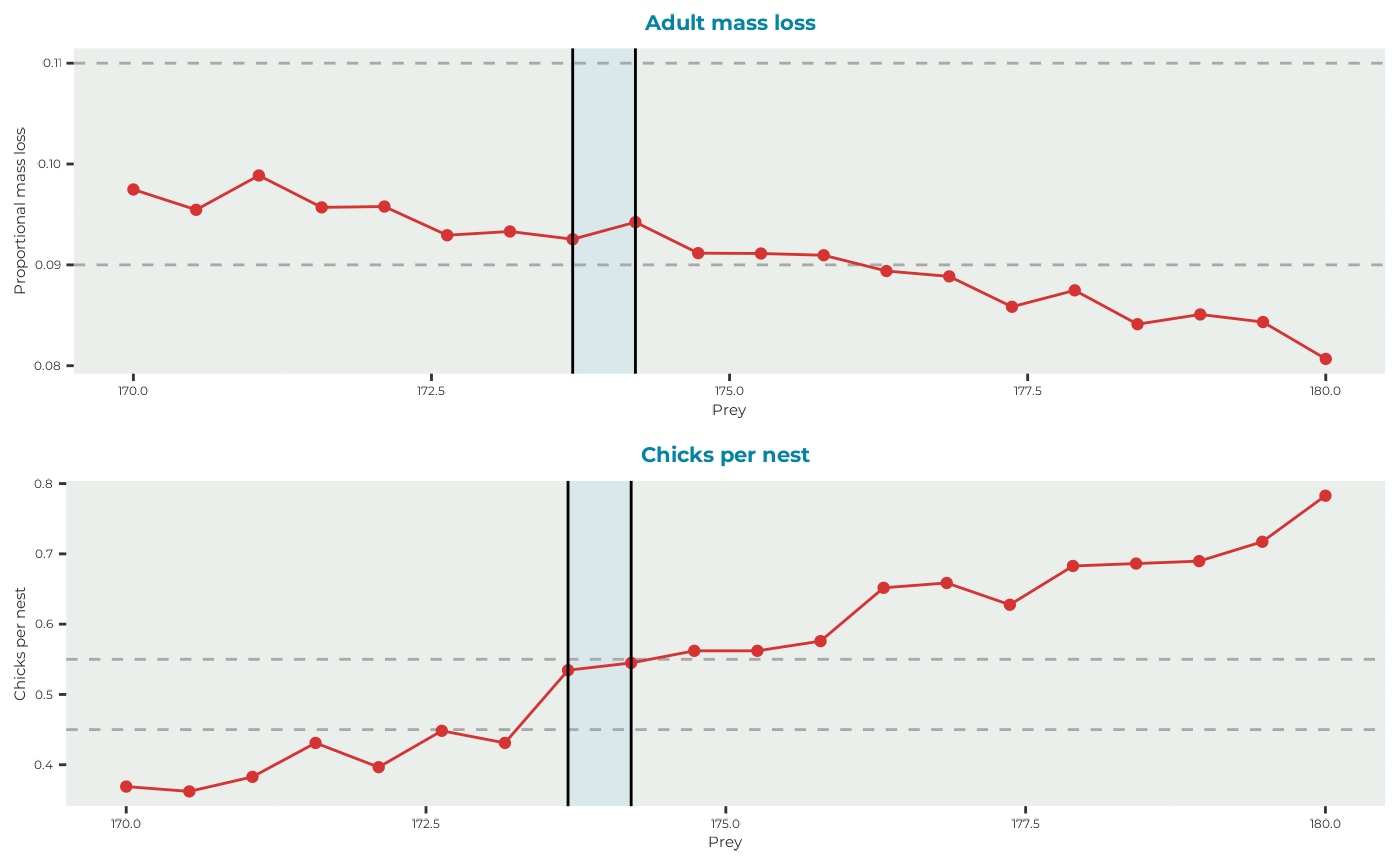
Where adult mass loss is the average percentage mass loss of adults over the duration of the chick-rearing season being simulated, and chicks per nest is the average number of chicks surviving per nest. The aim of calibration is to find the shared prey values contained within the upper and lower bounds between each output.
seabORD::plot_BirdFlightMap(
  sbordout_calibration$BirdFlightMap
)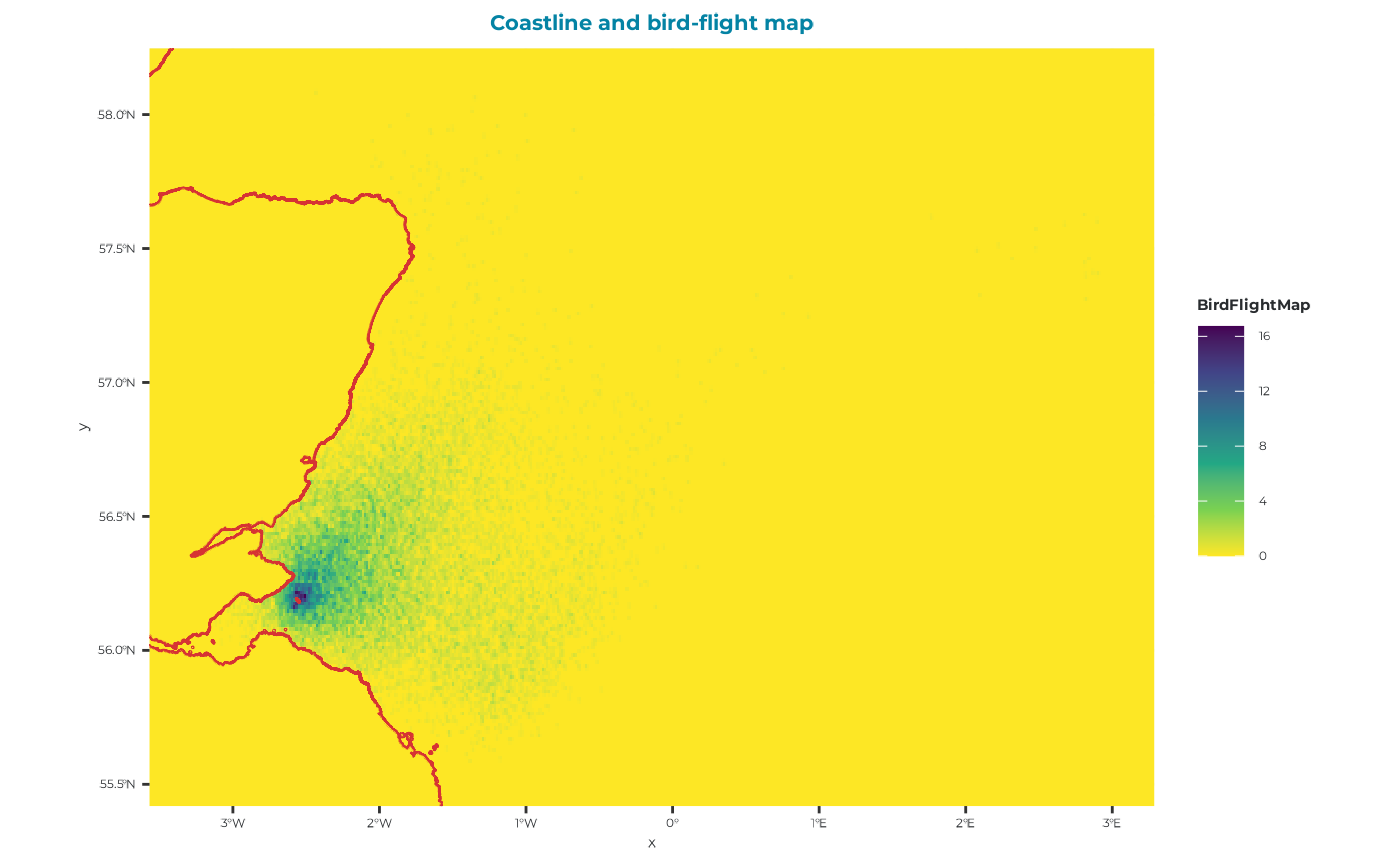
You can see from this map that there is no evidence of and ORD interactions, which is reassuring!
Now we will plot the adult outputs (sbordout$output_a0) and the chick outputs (sbordout$output_c0) against the range of prey values across replicates to obtain our calibrated estimates to be used in the scenario runs going forward.
Use the bounds for moderate conditions to be plotted.
# Identify prey values that simultaneously satisfy
# the adult mass loss and productivity constraints
calibration <- seabORD::calc_calibration_range(
  sbordout_calibration,
  masslower = 0.09,
  massupper = 0.11,
  prodlower = 0.45,
  produpper = 0.55
)

#plot it
seabORD::plot_calibration_outputs(
  sbordout_calibration,
  calibration = calibration,
  masslower = 0.09,
  massupper = 0.11,
  prodlower = 0.45,
  produpper = 0.55
)
Step 2: Running the model
Now that we have run our calibration step and discerned the prey values resulting in moderate conditions in the absence of wind farms, we can continue with running the main SeabORD runs with matched pairs of baseline (no ORDs) and scenario (ORDs included).
In this example we will run 5 scenario runs (wind farm footprints included) with a range of prey values (173-174).
Prepare inputs
For further information on inputs, please see Article “Example kittiwake: step 1 - seabORD inputs”.
This script will import the example parameters sets and spatial data, which are largely similar to the calibration inputs. Note will be given where these differ considerably, i.e., with regard to the inclusion of different wind farm footprints.
Parameters sets for the scenario run
Par
NOTE: “NScalefactor” is set to 1 meaning we are running with 100% of the population, which is customary for scenario runs.
Par_example <- seabORD::get_example_par()
str(Par_example)
#> List of 12
#>  $ thisSpecies        : chr "KI"
#>  $ colonies           : chr "UK9004171"
#>  $ Nscalefactor       : num 1
#>  $ Prob_Displacement  : num 0.6
#>  $ Prob_Barrier       : num 1
#>  $ PreyType           : chr "Uniform"
#>  $ collision          : chr "Off"
#>  $ SiteSelectionMethod: chr "Map"
#>  $ MaxDistancekm      : num 0
#>  $ PropInRange        : num 0
#>  $ Npairspercol       : num 2898
#>  $ Pmedian            : num 158
modPar
modPar_example <- seabORD::get_example_modpar()
str(modPar_example)
#> List of 5
#>  $ Nparallel  : logi NA
#>  $ initialseed: num 6598
#>  $ reference  : chr "serial_scenario_KI_UK9004171"
#>  $ outputdir  : chr "output_seabORD"
#>  $ Nreplicates: num 1
Create the output folder , for example “output_seabORD_scenario” and assign it
# Create the ouput folder "output_seabORD_scenario" specifically for scenario outputs if it doesn't alreay exist
if (!dir.exists("./output_seabORD_scenario")) {
  dir.create("./output_seabORD_scenario")
}
modPar_example$outputdir <- "output_seabORD_scenario"We intend to run 5 replicates so need to change this in modPar
modPar_example$Nreplicates <- 5Include the calibration in Par
NOTE: Run this test! here the replicates are specified - this must align with the number of prey values listed in “Par_example$Pmedian”
seabORD::check_calibration_inputs(
  Par = Par_example,
  modPar = modPar_example
)
#> Input mismatch: modPar$Nreplicates = 5 but length(Par$Pmedian) = 1. These values should be identical for calibration runs.
#> Calibration inputs valid: 5 replicate(s) and 1 prey value(s).
This is because we must include the right calibration values (5) if we want to run 5 replicates.
Change the values:
# min prey value from range determined in calibration
Pmin <- 173
# max prey value from range determined in calibration
Pmax <- 174

Par_example <- seabORD::set_prey_sequence_in_par(
  Par = Par_example,
  modPar = modPar_example,
  Pmin = Pmin,
  Pmax = Pmax
)
str(Par_example$Pmedian) #should be good to go!
#>  num [1:5] 173 173 174 174 174

seabORD::check_calibration_inputs(
  Par = Par_example,
  modPar = modPar_example
)
#> Calibration inputs valid: 5 replicate(s) and 5 prey value(s).
ordPar
ordPar_example <-  seabORD::get_example_ordPar()
str(ordPar_example)
#> List of 4
#>  $ include_ORDs   : chr [1:2] "NEART" "INCAP"
#>  $ parnames       : chr "NEART;INCAP"
#>  $ FootprintBorder: num 2
#>  $ BufferZone     : num 5
Switches
Turn on the switch “savebirdflightmap”, to see an example of the birdflightmap output. Turn on “saverds” to save the outputs as rds.
switches_example <- seabORD::get_example_switches()
switches_example$savebirdflightmap <- TRUE
switches_example$saverds <- TRUE Running seabORD
Now that all the inputs are ready we can run the model using.
SeabORD runs including wind farms and full populations can take a while to run - even with a relatively small population of ~ 3,000 pairs.
The output will be saved in in your output directory set up in modPar.
To learn more about the main functions behind seabORD you can read the article on the main functions.
To see how you can read in and plot the results you can read the article “Example kittiwake: step 4 - interpreting the outputs” where we have an example output for you to play with.
SeabORDoutput <- seabord(Par = Par_example,
                         ordPar = ordPar_example,
                         modPar = modPar_example,
                         switches = switches_example,
                         seamask = seamask_example,
                         spadat1 = spadat1_example,
                         spadat2 = spadat2_example,
                         spdat = spdat_example,
                         BrdData = BrdData_example,
                         FrgCompData = FrgCompData_example,
                         fltdist_base = fltdist_base_example,
                         FlightGridcorrection = FlightGridcorrection,
                         ORDpoly = ORDpoly_example)
To learn more about the how to interpret the output you can read the article on the output interpretation.